Your charts stay closed.
The bot still trades.
Phantom Trader AI runs inside NinjaTrader. It finds the setup, takes the trade, and handles the stop and targets on every account you connect. Try it free for two weeks before you pay a cent. If you do not like it, cancel and you pay nothing.
<script> block at the bottom of this file,find
PTA SETTINGS, and paste your video URL into heroVideo.It will autoplay muted and loop, like a background reel.
The living brain
Watch it think.
This is the bot's brain. Every glowing dot is part of it watching the market. Every user feeds it data too. That makes it smarter, faster and better with every trade it takes.
The live brain loads here.
Open it full screen ↗A live look at the engine while it runs. This is not a mock-up. Any profit or loss shown is real recorded activity, before fees. It is not typical and it is not a promise. One month never tells you what the next one will do.
The last 30 days
+$15,758 on my core accounts.
This is my own core accounts over the last 30 days, straight out of Phantom Control. 20 trading days. 13 green, 7 red. The red days are in there too, because hiding them would be pointless.
- Net P&L
- +$15,758 Before commissions
- Win rate
- 65.5% 635 trades
- Trading days
- 20 13 green, 7 red
- Total R
- 19.05 1R = what the trade risked
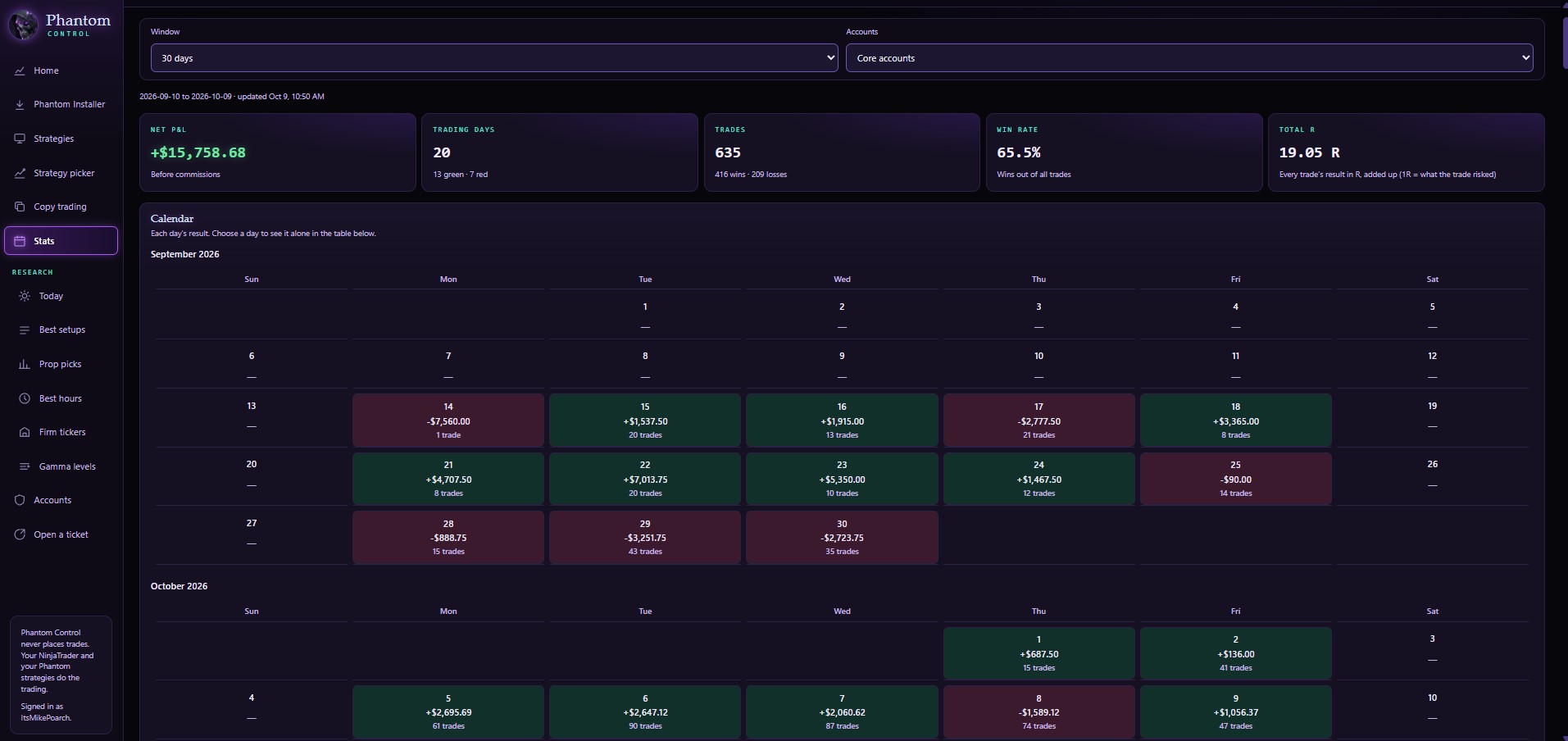
My own core accounts, 10 September to 9 October 2026, before commissions. This is what my accounts did. It is not a forecast of what you will earn, and one month never tells you what the next one will do.
Phantom Control
Pick what is working. In two clicks.
Phantom Control is the command center that comes with the bot. It opens in your browser, so there is nothing extra to install. You see every account, every open trade and today's profit in one place. Best of all, it shows you which strategies are working right now. And you can run the whole thing from your phone.
Every strategy the fleet runs, ranked by how it is doing right now, with its numbers attached. Pick the ones you want and send them to your bot.
See which hours of the day each strategy actually makes money in. Every strategy you pick runs only in its best hours on its own. You can loosen that any time you want to.
Copy the exact strategies I am running, with my settings, in one click. Not a starter pack. The same ones I use. You do not have to work yours out from scratch.
Turn strategies on and off from your phone. Watch your live trades and your results. Switch things up from anywhere, without a computer.
Bonus, included
You also get a trade copier.
One signal can place the same trade on as many accounts as you want.
Under the hood
It trades real volume.
Not a stack of indicators.
It reads dozens of data points at once. Then it boils them down to one question. Is this trade worth the risk, right now?
- It reads everything at once Where the big money actually traded. What the order book is doing. How pushy the buying and selling is. What kind of market it is today. All of it, on every bar.
- It scores the risk All those readings collapse into a single judgement. If the odds do not justify the risk, it does not take the trade. Sitting out is a decision it makes on purpose, and it makes it constantly.
- It keeps adjusting after it is in The market keeps moving after you are in, so the bot keeps working. It moves the stop and resets targets. If the flow turns against the trade, it gets out early instead of hoping.
- It learns from the ones that lose Every trade is saved along with the exact data it saw at the time. The losers matter most. They are what sharpen the next call.
There is a good deal more in there than we publish, and that part stays in-house. It is the edge, and giving it away would end it. The bot is also updated regularly, because markets adapt and anything that stands still stops working.
Phantom builds its own volume map from the tape. It works out where the big money really traded. The busiest price, the edges of the value area, the shelves and the gaps. Those are the prices big firms defend, and that is where it hunts. It works all of this out by itself. There is nothing else to install and nothing to tune.
It reads every level on four clocks at once. Yesterday's session. Today's session. A longer anchor like the week or month. And bigger time frame zones. So a three minute chart still knows where the weekly shelf sits.
It has nine ways to enter a trade. Fades, breakouts, failed breakouts, trend joins, order book sweeps and more. You can switch each one on or off by itself, for each ticker and each time frame.
A signal is only a candidate. It still has to pass the trend filter, the scoring, the market type check, your trading hours, your dollar risk cap, the news blackout and the learning gate. Only then does an order go out.
A built-in Level 2 engine watches the order book. It sees big buyers soaking up the selling, which side is heavier, and how pushy the flow is. It tunes itself to each ticker's own recent history. There are no magic numbers for you to set.
Every candidate gets one of these three, with the reason named in plain English. Seven kill switches sit behind it: a liquidity vacuum, a book that just got pulled, a delta divergence and so on. When the engine stands down you can see exactly which one stopped it. On a CAUTION it can take half size instead of full. On DO NOT TRADE it does not trade.
Once it is in
Stops and targets
- Stops sit on real swing structure, not a fixed tick count
- Size is worked out from your dollar risk, after the stop is set
- A four rung target ladder that scales out on the way up
- Targets can seat at the next real shelf instead of a flat multiple
- Breakeven, trailing, give back protection and a time stop
- It closes early if the flow turns against the trade
While you are away
It runs without you
- All of it happens the instant the bar closes
- Charts open or closed makes no difference to it
- A daily directive adapts what each chart may do as the regime shifts
- High impact news puts new entries on hold automatically
- Stops and targets are local, so a server hiccup cannot touch them
- Nothing on our end can orphan an open position of yours
The shadow journal
It keeps score on the trades it refused.
Most bots throw away the trades they skip. So you never learn if the filter saved you money or cost you money. Phantom saves every trade it turned down, with its entry, stop and targets. Then it follows that trade bar by bar to see how it would have ended.
Which means every filter in the thing has to earn its place. A gate that blocks losers is doing its job. A gate that keeps blocking winners gets found and pulled out. It is also what the machine learning trains on, and it produces far more data to learn from than live trades alone ever could.
Published trade log
44 trades, posted publicly, losses included.
This is the full NQ history from 23 March to 26 May 2026, one contract, exactly as it happened. The stop-outs are in there too. It is the same sheet linked from the bio, so you can go read every line yourself instead of taking my word for it.
- Net P&L
- +$9,045.68 +9.05% on account
- Win rate
- 68.2% 30 wins, 14 losses
- Profit factor
- 1.95 $18,592 won, $9,546 lost
- Worst drawdown
- −$2,252 Peak to trough, closed trades
Actual recorded results, 1 contract, 23 Mar to 26 May 2026. Hover the line to read any individual trade. Open the full trade log. One period does not tell you what the next one does. Past performance is not indicative of future results.
Verified reviews
What people say about Mike.
Collected and checked by Whop. They are shown word for word, exactly as members wrote them. They were not written on this page and cannot be edited here.
★★★★★
Wow!! Phantom trader!
Mike brought something genuinely great to the table with Phantom. This isn’t just another copy-and-paste trading bot. There is real thought behind the strategies, account management, risk controls, analytics, and the direction of the platform.
Developer EndoJW works like a mad scientist. The guy is constantly testing, fixing, improving, and pushing the system forward. The bot isn’t perfect, and I don’t expect any trading system to be. What matters to me is that the work never stops. When something needs attention, EndoJW is already in the lab busting his ass to make it better.
I’m happy with Phantom. I’ve seen real potential in the trading, and the level of visibility and control keeps improving. EndoJW brings relentless execution and problem solving to the table. I'm happy I gave it a chance, and I'm excited for what the future holds.
DiamondKing@djdiamondking · verified purchase
★★★★★
I have followed Mike and his journey since the wild days of the "memestock" thievery. I have learned more from him than I could write in a blurb here. I have gone from being an "Ape" to something much more resembling a trader. Sure, he can tell you how to make money in various ways, but he also has a large variety of tools available to teach you many different areas of this large and growing world of trading.
He offers penny stocks, futures callouts, dividends, one-on-one lives, group lives, and now he has an actual bot capable of defending against and even taking advantage of "big money's" moves. The bot seems world changing, not just life changing.
On top of what he's offering, the community inside his Discord alone is something you should see yourself — it has taught me much more than I ever expected.
10/5 I highly recommend.
Patrick Flanagan@patrickmflanagan88 · verified purchase
★★★★★
Takes a minute to set things up but you will make money I took longer than most but I am 2 days away from passing my first eval and ive been paying a month for this service. June will be a money printing machine. Mike is there for you and the rest of his team to help as well as the members. 10/10 join to leave the matrix and take your freedom back. I will always trade my money for the chance of winning back freedom.
James Shelley@jashelley · verified purchase
★★★★★
Product has been amazing! Great support on Discord to help you with any problems. Doesn't take long to set up at all.
Patrick Hollingsworth@phollingsworth86 · verified purchase
★★★★★
Whole heartedly i believe the products and community Mike brings to the table are unmatched. I've had several of his products for almost 2 years now! The best part isn't that they work great its that i improve as a trader every week because of these products. Mike has given me the opportunity to make life changing money and i couldn't be grateful enough for it!
Brian@bdakidd56 · verified purchase
★★★★★
Solid seller, helps step by step with any issues one might have! Definitely recommend doing business with!
Tej@itsjetbackwards · verified purchase
Reviews are collected and checked by Whop and shown as written. They are one person's own experience with Mike's paid services. Results like these are not typical and are not a promise. Do not expect them. Reviewers were paid nothing to write them. Trading futures has a real risk of loss.
In their own words
Hear it from the people running it.
Real members, filmed on their own phones. No script, no paid actors.
These are members' own videos and their own opinions. Any numbers shown are that person's own results. They are not typical and not a promise. Do not expect them. Trading futures has a real risk of loss.
Caught on screen
Here it is actually doing it.
Real sessions, recorded. The reels up top walk you through it. The recordings underneath are raw screen captures with no narration, just the bot taking and closing trades while nobody is watching the chart.
Numbers in these clips are one person's own results. They are not typical and not a promise. What happened before does not predict what happens next.
Why people switch
The setup was never the problem.
Most traders can spot a decent entry. What blows up the account is the twenty seconds after it. Moving the stop. Sizing up to win it back. The revenge trade at 2:40. Phantom never has those twenty seconds. It scores the setup, takes it or skips it, and handles the exit the same way on your worst day as your best one.
Doing it yourself
Trading on emotions
- Entries and exits move with your mood
- Whole days lost staring at charts
- Size creeps up after a couple of losers
- You hesitate and the move goes without you
- One account at a time, by hand
Letting it run
Trading on rules
- Same entry and exit logic every session
- You get your day back
- Loss limits enforced by the software, not willpower
- It takes the trade the second it qualifies
- Every account you have enabled, at once
What you get
The bot, and everything around it.
Software on its own does not keep anyone trading. What keeps you going is knowing how to set it up, seeing what it did, and having somewhere to ask when something looks off.
Phantom Control
Every account on one screen with its balance, profit today and open trade. It runs in your browser, so there is nothing extra to install.
Best setups and best hours
Every strategy the fleet runs, ranked by what is working now and the hours it works best in. Assign what you want, or copy my core settings straight across.
Guardian rules
Set a daily loss limit, a profit goal and a pass target for each account. Hit the number and that account stops trading until tomorrow.
Trade copier included
One signal into as many accounts as you want, each sized on its own. Sold elsewhere as a $100 to $500 add-on. Here it is part of the software.
Step by step setup videos
Every click, in order, start to finish. Follow along and you will be running. Skip them and you will be the person in the chat asking why it is not installed right.
Private members' channel
A room full of people running the same thing. Settings that worked, settings that did not, and somewhere to get a straight answer when something looks wrong.
Getting going
Running the same day.
Most people are installed and trading on sim within an hour of joining.
Install it
Drop the bot into NinjaTrader and connect your accounts. The setup video shows the exact clicks. Watch it, do not skip it.
Set your limits
Contract size, daily loss limit, daily goal, which sessions it is allowed to trade. Start on sim until you have seen it behave for a few days.
Turn it on
It watches, waits, and takes the trade when it qualifies. Check the log whenever you feel like it. Two weeks to decide if you want to keep it.
What you need
NinjaTrader, and an account it can reach.
The bot runs inside NinjaTrader 8. That is the requirement. If your broker or funding firm connects to NinjaTrader, you are fine. If it does not, this is not for you, and I would rather say that now than after you have paid.
Required
The platform the bot actually runs in.
NinjaTrader is free for charts and sim trading. So you can set it all up and watch it trade on sim before you risk a dollar.
On a Mac? NinjaTrader is a Windows program, so it runs on a Mac through Parallels, VMware Fusion or Boot Camp. Plenty of members trade that way. You will need a Windows license and the virtual machine software, and we will walk you through it on the setup call.
Funding firms people run it on
Anything that gives you a NinjaTrader connection. Check your firm's rules on bots before you run one on an evaluation or funded account. Those rules change, and it is your account on the line.
Questions
Before you start the trial.
What happens during the 14 days?
You get the bot, the setup videos and the members' channel straight away, same as everyone else. Install it, run it on sim or live, and see how it trades. If you do not like it, cancel before the 14 days are up and you are not charged.
If you do not cancel, the subscription starts automatically at $349.99 per month when the 14 days end, and renews monthly until you cancel. You can cancel at any time from your Whop account.
How much money do I need to start?
Less than most people think. The cheapest way in is a prop firm. You pay a fee for an evaluation and trade the firm's money instead of your own. Phantom works with most prop firms. Every firm has its own rules on bots and they change, so check yours first. If you would rather trade your own live account, $500 is a fair place to start on micro contracts. Run one micro contract at a time and set a daily loss limit to match. More money gives you more room to ride out a normal losing streak. Never use money you cannot afford to lose.
Do I need to know how to trade already?
No. If you can follow a video and click where it tells you, you can get this running. Understanding the strategy helps, and it is all explained in the training, but you do not need to be profitable on your own first.
What's the most common problem people hit?
They skip the onboarding videos, and then it is not installed correctly. That is genuinely the main one. The videos walk you through every single step, in order, so all you have to do is watch and follow along. Do not skip the setup videos and you will be fine.
What does it actually look at before it trades?
It builds its own volume map from the tape and finds where the big money traded. The busiest price, the edges of the value area, and the busy and quiet shelves. It reads those on four clocks at once and has nine ways it can enter. A signal then has to pass a line of checks before any order goes out. A trend filter, a score, a market type check, your trading hours and your dollar risk cap. The last word goes to a Level 2 engine that watches the order book and answers SAFE, CAUTION or DO NOT TRADE, and tells you why. On top of that, a learning gate scores the setup and can veto it. It works all of this out itself, so you are not installing other indicators.
What conditions suit it best?
It holds up well across the board, for three reasons. First, it knows the difference between a dead market and a panic, and it will not use the same settings in both. Second, it only takes setups it scores as worth the risk, so when things get messy it takes fewer trades instead of forcing them. Third, you are never stuck with one strategy. If the market shifts, open Phantom Control, see the best setups for right now, and switch off what has gone cold. A couple of clicks. There is also a daily note that can narrow what each chart is allowed to do.
Can I close a trade myself?
Yes. Close any trade with one click, and switch the bot off whenever you want, from your computer or your phone. There is also a Flatten All button that closes everything on every account at once.
Can I run it on a prop firm evaluation?
Plenty of members do. Every firm has its own rules on bots and they change, so check yours before you run it on an evaluation or funded account. That part is on you as the account holder.
Can I change what it trades?
Yes, that is what Phantom Control is for. Every strategy the fleet runs is listed with its numbers. The Best Setups tab shows what is working now, the Best Hours tab shows when it works, and you assign the ones you want to your own bot. You can also copy my core settings straight across.
Will this teach me anything, or just trade for me?
Both, if you want it to. A lot of people start by watching how it picks and manages trades, then begin taking the same setups by hand. Used that way it is a decent way to learn a repeatable process.
Start the trial
Two weeks. No charge.
See if you like it.
Install it, set your limits, and watch it trade. If it is not for you, cancel before day 14 and that is the end of it.
Start My 14 Day Free TrialNo Charge TodayFutures trading has a real risk of loss. Only trade with money you can afford to lose.
Start your 14 days free
Quick details, then straight through to checkout. No charge for two weeks. After that it is $349.99 a month unless you cancel.